简介
【基本介绍】
Sit anywhere in your house and watch movies or TV shows on your iPhone, iPod or iPad.
VLC Streamer streams movies from your computer to your iDevice. Winner *Best Entertainment App* Chip.de.
You can watch anything from your movie collection. No need for complex conversion processes. No need to manually transfer programs to your device.
“Can these guys do no wrong Seriously, if only other app devs knew how to make apps as well as these guys, the world would be a better place. Or at least my device would be less buggy. I was just watching a Full HD copy of Avatar Extended Edition being streamed from my PC on my iPod Touch 2nd Generation and it looked and played amazingly.”
- UK Reviewer
“…it's as good as having the original VLC player on your iOS device…”
-
“…Setup is a snap and literally takes 2 seconds. You can browse through all your movies from your device and click any one to start playing. It even works if you have the movies stored on a USB drive connected to the host computer.”
-The Times of India
“Took me seconds to setup to stream from a secondary drive in my home office. Going straight out to get a cable for my TV.”
- USA Reviewer
“….This sucker can stream off the pc and plays virtually anything you throw at it. Download it now!”
- TaxiDriver at
There are a huge number of movie formats, and VLC can convert most of them - but it can't convert everything. If you have any doubts, then please try the free version of this application first.
? Features include ?
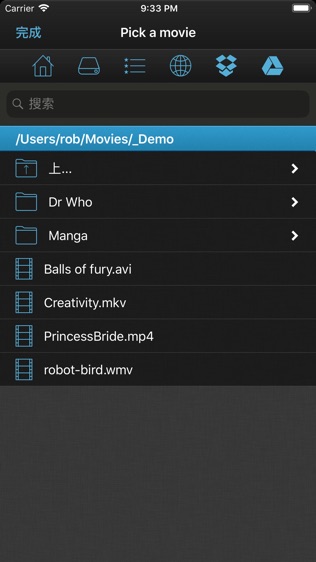
- Free helper app gets you streaming quickly and allows you to browse local drives, and Windows network shares
- Stream over wifi directly from your computer
- Customisable gesture controls
- Support for multiple resolutions and streaming quality levels
- Live streaming of video after a few seconds of processing
(assumes a reasonably powered computer)
? System Requirements ?
- VLC Streamer will not play DRM protected videos. Videos from the iTunes store do include DRM.
- VLC Streamer is designed to work on your local network, and the free helper app has to run on your Mac or PC. ??
- Supports Windows, Vista, Windows 7 and Window 8
- Supports Mac OS 10.7 and above.
? Response to feedback ?
-If you do have any problems streaming movies, then please just check the help instructions in the app. Feel free to drop me an email (my personal mail is in the app) if you need help.
? Subscription Information ?
VLC Streamer is supported through an auto-renewing subscription which you can choose to purchase within the app.
? The subscription is called 'VLC Streamer Annual Subscription '
? It is an annual subscription. It gets rid of the adverts and unlocks all functions, including downloading movies to your device
? Payment will be charged to iTunes Account at confirmation of purchase
? Subscription automatically renews unless auto-renew is turned off at least 24-hours before the end of the current period
? Account will be charged for renewal within 24-hours prior to the end of the current period
? Subscriptions may be managed by the user and auto-renewal may be turned off by going to the user's Account Settings after purchase
? Terms of use are available at https://HobbyistSoftware.com/terms
? Privacy policy is available at https://HobbyistSoftware.com/privacy
Enjoy!
【更新日志】
More bugs squashed
Improved network scanning
Fixed manual remote entry
Updated for the latest iOS
Brought back search







 最新软件
最新软件 相关合集
更多
相关合集
更多
 热搜标签
热搜标签
 网友评论
网友评论
 添加表情
添加表情 


 色情
色情


 官方
官方
 纠错
纠错


















 360查杀木马软件
 AdsFix(网页病毒查杀软件)
 mydocument病毒查杀软件
 安心软件园
安心软件园
 智慧西安软件园
 福州软件园
福州软件园
 齐鲁软件园
齐鲁软件园

 海啸媒体播放器
 高清媒体播放器
 恶意软件查杀助理
 mydocument病毒查杀软件
 智慧西安软件园
 安心软件园
安心软件园
 齐鲁软件园
齐鲁软件园
 相关教程
相关教程